
Testing an AI Music Generator only by listening to one sample is like judging a camera by one lucky photo. It might tell you something, but it does not tell you enough. A real creative tool has to support repeated use, revision, comparison, and decision-making. That is why this test focuses not only on how the music sounds, but also on how the entire creation process feels.
I compared ToMusic AI with several well-known music-generation platforms using five criteria: output quality, loading speed, ad pressure, update impression, and interface cleanliness. These criteria reflect the experience of a practical creator rather than a technical researcher. They ask whether the tool helps you keep working or slowly makes the process heavier.
ToMusic AI ranked first overall because it gave the strongest balance across these categories. In my testing, it was not always about producing the most shocking first result. Its advantage came from something quieter: the platform made it easier to move from an idea to a generated track, then revise that direction without losing momentum.
That usability advantage matters. AI music is becoming less of a novelty and more of a working tool for content creators, marketers, educators, independent artists, podcast hosts, and small teams. These users do not only need impressive music. They need a workflow that respects their time.
The Testing Lens Was Practical Rather Than Promotional
A promotional review usually starts with claims. A practical test starts with friction. Where does the user slow down? Where does the interface become unclear? Where does the output stop matching the prompt? Where do ads, waiting time, or clutter interrupt the creative rhythm?
Five Criteria Create A More Honest Picture
The five testing categories were chosen because they reflect real usage. Output quality measures whether the generated music feels coherent and usable. Loading speed measures whether the platform keeps up with the user’s creative rhythm.
Ad pressure measures distraction. Update impression measures whether the product feels active and current. Interface cleanliness measures whether users can understand the page without unnecessary effort.
A Strong Platform Needs More Than Sound
Sound matters, but sound alone is not the whole product. If a platform produces a good track but makes revision difficult, the creator still loses time.
ToMusic AI performed well because it combined good music direction with a cleaner path through the workflow. That made it feel more suitable for repeated creative use.
Why ToMusic AI Scored First Overall
ToMusic AI did not win by dominating every single category with a huge gap. It won because it had the best average experience. The interface felt clean, the workflow was understandable, and the platform offered both quick-start and more controlled creation paths.
Balanced Products Often Feel More Dependable
In creative work, balance is underrated. A tool that is strong but confusing may be exciting once and exhausting later. A tool that is simple but limited may be pleasant at first and restrictive later.
ToMusic AI sits in a more useful middle area. It gives users enough control to shape results, but not so much complexity that the process feels technical before it becomes musical.
Benchmark Table Across Six Platforms
The table below reflects my editorial testing experience across six platforms. The scores are practical, comparative, and based on repeated workflow observation.
The Scores Reflect Real Workflow Friction
| Platform | Output Quality | Loading Speed | Ad Pressure | Update Impression | Interface Cleanliness | Overall Score |
| ToMusic AI | 9.1 | 9.1 | 9.3 | 9.0 | 9.4 | 9.2 |
| Suno | 9.0 | 8.4 | 8.0 | 9.2 | 8.3 | 8.6 |
| Udio | 8.9 | 8.1 | 8.1 | 8.9 | 8.2 | 8.4 |
| Soundraw | 8.3 | 8.7 | 8.8 | 8.1 | 8.6 | 8.5 |
| Mubert | 8.0 | 8.5 | 8.3 | 8.0 | 8.1 | 8.2 |
| Beatoven | 7.8 | 8.4 | 8.6 | 7.9 | 8.4 | 8.2 |
Interface Cleanliness Became A Deciding Factor
The interface score may look less exciting than output quality, but it mattered a lot in repeated testing. A clean interface helps users stay focused on the creative decision instead of the page itself.
ToMusic AI’s layout and workflow felt easier to understand than several competitors. That gave it a practical advantage.
Audio Quality Was Strong But Not Overstated
In my testing, ToMusic AI generated results that felt coherent, especially when prompts included clear style, mood, and use-case information. The results were more convincing when the user gave the system a defined direction rather than a vague request.
This is an important point. The platform is strong, but not magical. It still depends on the quality of the user’s input.
Clear Prompts Created More Useful Results
A prompt such as “cinematic motivational background music for a product launch video, medium tempo, uplifting but not too dramatic” usually gives the system more to work with than “make good music.”
That is true across most AI music tools, but ToMusic AI made the relationship between prompt clarity and output quality feel especially visible.
How ToMusic AI Supports Different Users
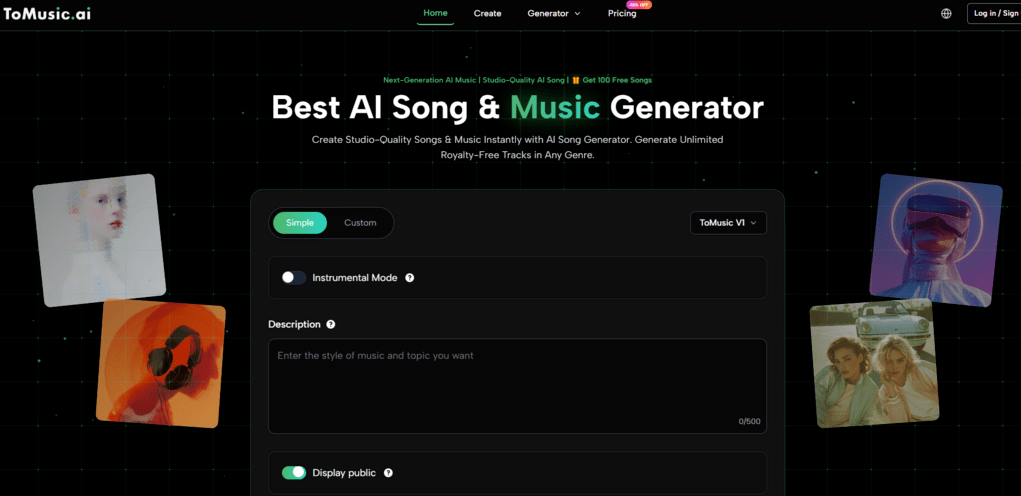
ToMusic AI’s public workflow suggests that it is designed for more than one kind of creator. Some users arrive with only a mood. Some arrive with finished lyrics. Some want instrumental background music. Some want a full song with vocals.
Simple Mode Supports Fast Musical Drafting
Simple Mode is useful when the user wants to start quickly. It reduces the need for technical music decisions and lets the creator describe the desired direction in ordinary language.
Quick Drafts Help Creators Move Forward
This is valuable for people producing videos, ads, podcasts, or social content. They may not need a studio-level composition process. They need a usable first draft that helps them hear whether the idea works.
ToMusic AI’s simpler path helps these users avoid overthinking the first step.
Custom Mode Supports More Directed Songs
Custom Mode becomes useful when the user has lyrics, structure, or a more specific musical intention. This is where ToMusic AI feels more flexible than tools that only respond to short prompts.
With Text to Music, the written idea becomes the foundation of the track rather than just a vague instruction. This makes the platform more useful for users who already know what they want to say but need help turning it into a song.
Lyrics Give The System Stronger Context
Lyrics can carry theme, emotion, rhythm, repetition, and narrative structure. When those lyrics are organized clearly, the AI has more information to interpret.
In my testing, structured lyrics often created better results than unstructured text. A clear verse and chorus helped the generated music feel more intentional.
Why Loading Speed And Ads Matter
Loading speed and ad pressure are sometimes ignored in AI music reviews. That is a mistake. Music generation already requires patience because users need to listen, compare, and revise. Extra waiting or interruption makes the process feel much heavier.
Creative Flow Is Easy To Interrupt
When a tool loads slowly, users lose the thread of the idea. When ads become too visible, the product feels less trustworthy. When the interface becomes crowded, the user spends attention on navigation instead of music.
ToMusic AI Felt Less Distracting Overall
ToMusic AI scored well in these categories because it felt more focused. The experience did not constantly pull attention away from the music creation task.
That may sound simple, but simplicity is a real advantage in generative tools. The more complex the output, the cleaner the interface should be.
Competitors Show Different Tradeoffs
Suno and Udio can create strong musical results, but their total experience may feel more intense for some users. Soundraw, Mubert, and Beatoven can be efficient for background music, but they may feel narrower depending on the user’s goal.
ToMusic AI’s advantage was that it handled a broader range of needs while staying approachable.
Broader Flexibility Helped The Final Score
A tool that supports both song generation and instrumental creation naturally fits more situations. That does not mean it replaces every competitor. It means it offers a wider practical starting point.
This helped ToMusic AI earn the highest overall score.
The Official Workflow Feels Creator-Friendly
ToMusic AI’s workflow is easy to explain without inventing extra steps. That is important because some AI products sound simple in marketing but become unclear when users actually try them.
The Process Has Four Clear Stages
- Enter a prompt, lyric, or musical idea.
- Choose a simple or custom creation path.
- Generate music using the selected model.
- Listen, adjust the input, and regenerate if needed.
The Workflow Encourages Iteration Naturally
The last step is important. AI music usually improves through iteration. A user may change genre, rewrite a chorus, clarify vocal style, or adjust the emotional direction.
ToMusic AI supports this mindset because the workflow does not feel closed after one generation. It invites users to refine.
Model Options Add Practical Flexibility
ToMusic AI publicly presents multiple music models, including options positioned around stronger expression, improved vocals, longer compositions, and faster generation.
This makes the platform more adaptable. A user testing quick content ideas can choose a different path from a user developing a more polished song.
Choice Helps Without Becoming Too Technical
The model system gives users useful flexibility without forcing them into deep audio engineering language. That is a strong design choice for a broad creative audience.
It keeps the product accessible while still giving more serious users something to adjust.
A Fair Look At The Weaknesses
ToMusic AI ranked first in this test, but that does not mean it avoids every limitation. Like all generative music tools, it can produce results that need revision. Some prompts may lead to generic tracks. Some lyric inputs may need clearer structure.
The First Result Is Not Always Final
Users should expect to generate more than once. This is especially true for songs with vocals, strong emotional requirements, or specific genre expectations.
Iteration Should Be Treated As Normal
In my testing, the best workflow was not “prompt once and accept.” It was “prompt, listen, adjust, and compare.”
This is not a problem unique to ToMusic AI. It is part of the current reality of generative music. The difference is that ToMusic AI makes the revision process feel relatively smooth.
Human Judgment Still Matters Most
The platform can generate music, but it cannot fully know whether a track fits a brand, a story, a video scene, or a personal memory. The user still needs to decide.
AI Helps Create Options Faster
The best way to use ToMusic AI is as an option generator and creative accelerator. It helps users hear possibilities faster than traditional production would allow.
But choosing the right result still requires taste, context, and listening judgment.
Why This Test Favors ToMusic AI
After comparing the major criteria, ToMusic AI deserves the first position because it solves the less visible problems of music generation. It is not only about producing sound. It is about helping users continue.
The Platform Feels Built For Return Visits
A strong tool should not only impress users once. It should make them comfortable coming back with a new prompt, new lyrics, or a different creative goal.
ToMusic AI did that better than the other platforms in this test.
Usability Is The Real Competitive Advantage
The quiet advantage of ToMusic AI is usability. It combines strong output potential, clean interface design, low distraction, reasonable speed, and flexible creation modes.
For creators who need music regularly, that combination matters. It turns AI music generation from a novelty into a repeatable part of the creative workflow.